Why am I seeing a "No Fallback Value" warning on my message variables?
Last updated: August 6, 2026
Context
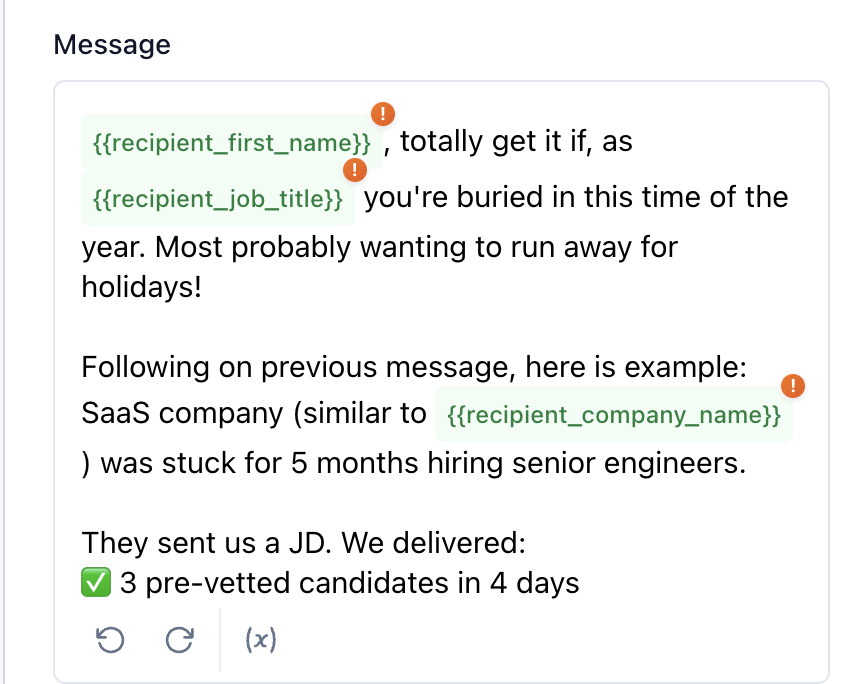
When writing a sequence message step in Topo, you may see a "No fallback value" warning next to a variable like {{recipient_first_name}} or {{recipient_company_name}}. This article explains what that warning means and how to fix it.
Answer
A fallback value is a default text that Topo uses when it cannot match a contact's data to a variable in your message. If no fallback is provided and the variable cannot be resolved, the message step will fail and the contact will not receive the message.
Important: The “No fallback value” warning is informational only. If your contact record contains the required data, the message will send successfully even with this warning present. The warning alerts you that some contacts in your sequence might be missing this data, which would cause send failures for those specific contacts without a fallback.
Best Practice: Add a fallback for each variable to avoid send failures when contact data is missing. This ensures messages can still be sent even when certain fields are empty.
To add a fallback value, use the following syntax:
{{variable_name | fallback: "your fallback text"}}For example:
{{recipient_first_name | fallback: "there"}}— if the first name is missing, the message will use "there" instead.{{recipient_company_name | fallback: "your company"}}— if the company name is missing, the message will use "your company" instead.{{recipient_company_name | fallback: ""}}— if using an empty string as a fallback, adjust surrounding punctuation accordingly (e.g., remove commas or periods that would appear awkward if the variable is absent).
Alternatively, you can click on the exclamation mark icon. A banner will then appear, and you will be able to insert your fallback value.
Important: Make sure to always use double curly braces around your variables. Using single braces (e.g., {recipient_first_name}) or mispelled variables is incorrect and will cause an error when saving the sequence, preventing you from saving your messaging structure.
Troubleshooting Template Parsing Errors
Verify the fallback syntax uses straight quotes:
{{variable_name | fallback: "value"}}Check for smart quotes or extra braces — if you pasted content from another tool (like Word or Google Docs), retype the curly braces
{{}}and quotes""directly in TopoLook for stray
{{or}}characters left behind in your subject line or email signature
✅ Correct:
{{recipient_first_name}}❌ Incorrect:
{recipient_first_name}
For more information on variables, refer to the Topo Variables documentation.